Inspection > Voyage Reconciliation > View Parcel Losses
Once the quantity results are entered into an inspection worksheet and submitted, Navarik Inspection can calculate the parcel's ship-to-shore losses.
If the parcel inspection is for a load, Navarik Inspection compares the values from the shore bill of lading to the total calculated volume for the tanks loaded measured on the vessel. For a discharge, Navarik Inspection compares values measured on the vessel for the loaded tanks before discharge to the values measured on the shore after discharge.
For more information, see Loss Calculations.
You can view parcel losses several ways. The steps for viewing the losses are outlined below.
| 1. | Select Trips>Inspection Worksheets. |
| 2. | Open the inspection worksheet for the parcel you wish to view. |
| 3. | In the Reconciliation Summary section, view the losses. |
|
| 1. | Select Trips>Inspection Worksheets. |
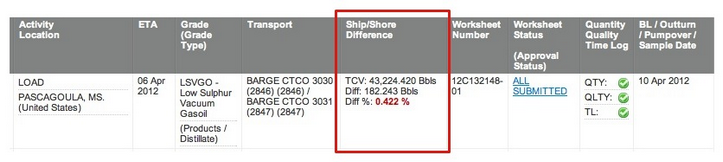
| 2. | In the Ship/Shore Difference column, view the losses. |
|
| 2. | Find the voyage with the parcel with the loss figures to view. |
| 4. | Select Trips>Nominations. |
| 5. | The Nominations list appears. |
| 6. | Open the nomination with the parcel with the loss figures to view. |
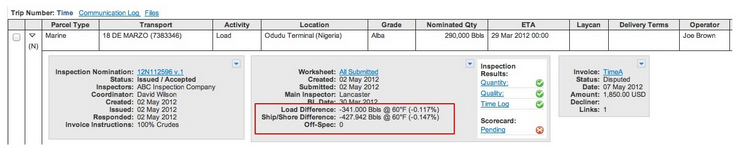
| 7. | Click the Voyage Details tab. |
|
| 2. | In the Reports list, select Monthly Reconciliation Summary. |
|
|
Navarik © 2016 All Rights Reserved
|



