| Top Back Forward Expand All Collapse All Print |
View Voyage Reconciliation Summary |
|||
View Voyage Reconciliation Summary |

|

|
| Top Back Forward Expand All Collapse All Print |
View Voyage Reconciliation Summary |
|||
View Voyage Reconciliation Summary |
|
|
Inspection > Voyage Reconciliation > View Voyage Reconciliation Summary
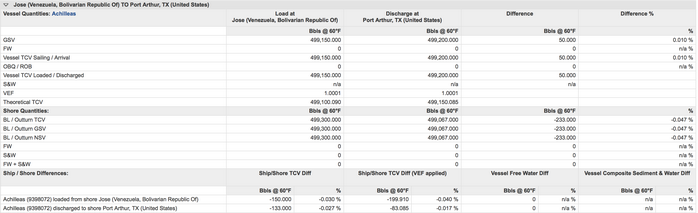
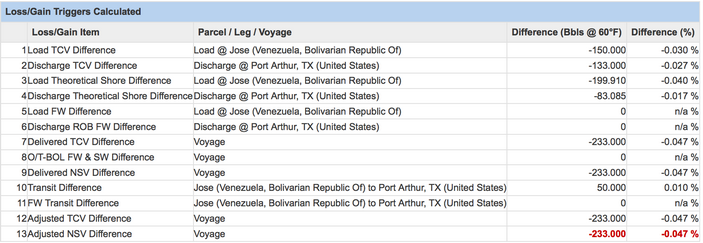
Once the losses or gains are calculated, the details are presented for each group of matched parcels in the Voyage Reconciliation Summary page. Each parcel grouping usually represents the movement of one grade or product.
The Voyage Reconciliation Summary presents the matched parcel groupings in the voyage, represented by tabs. For each parcel grouping, the inspection worksheets utilized to calculate the losses and gains are listed. Also, the button to download the VAR for this set of parcels are available. If multiple grades are involved in the voyage, use the Excel button beside the Actions menu to download the overall voyage VAR.
Dots are used to indicate the following:
| ▪ | Red = There is at least one loss item that is outside the specified threshold. |
| ▪ | Green = All loss items are within the specified thresholds. |
| ▪ | Yellow = At least one worksheet has quantity results in a retest state. |

The Voyage Reconciliation Summary are divided into three sections:
This section shows the comparison of Bill of Lading quantities with the Outturn quantities.
|
This section shows the comparison of the vessel quantities from one port to the next port. The ship to shore differences at each port are also presented.
|
The loss triggers calculated by the system when a voyage is reconciled are listed. The items that have differences outside the accepted thresholds are highlighted in red.
|
| Navarik © 2016 All Rights Reserved |