Inspection > Getting Started
Welcome to Navarik Inspection - a system that enables the management of the entire cargo inspection lifecycle, as shown in the diagram below.
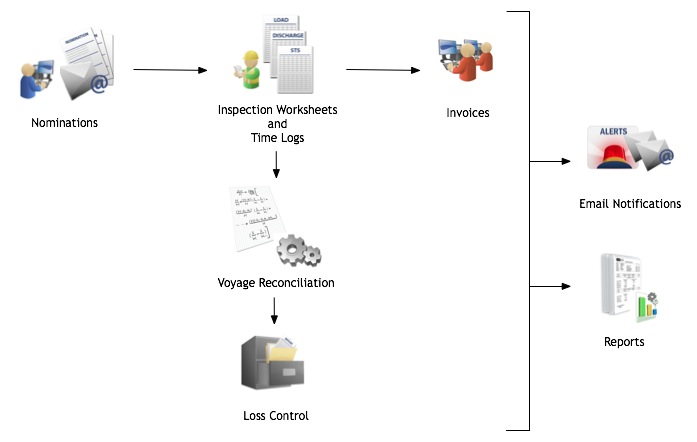
| • | An operator/scheduler specifies a nomination through pre-defined templates and standardized quality slates (tests and methods), vessels and ports to nominate an inspection company. |
| • | The inspection company receives, accepts and assigns the nomination to an inspector who completes the inspection and submits the worksheet, including the time log, into the system. |
| • | Automatic voyage reconciliation calculations and cargo quality checks alert operators and cargo assurance personnel if the quality and/or quantity actuals fall outside an acceptable range. |
| • | Upon acceptance of the inspection worksheets, invoices are electronically submitted from inspection companies and get checked, approved and batched for payment processing. |
| • | Cargo assurance personnel manage loss investigations and claims for voyages with losses and/or gains outside the accepted thresholds. |
| • | A detailed 4-point oil loss analysis and vessel, cargo and terminal trending reports can be generated to help mitigate risk and make better trading decisions. |
|
Learn More
Navarik Inspection organizes cargo-related information into voyages and parcels. It also maintains the catalogue data needed to manage the operational data related to cargo movements. User access to different parts of the system are controlled by permissions.
Click on the hyperlinks in the image above to view more details about each item. You may also want to learn some basics of Navarik Inspection.
|
Navarik © 2016 All Rights Reserved
|


